Article
Veeam Intelligence in VSPC - a warning about data scope in Advanced Mode
Results of a data-isolation test in the VSPC Customer Portal: the Advanced assistant returned metadata from other organizations. Scope of the observation and steps for administrators.
Hello everyone,
A brief warning for those who provide customers with Veeam Service Provider Console and have Veeam Intelligence enabled in Advanced mode.
While checking the Customer Portal, I encountered a data-isolation issue between organizations. The regular backup-job view showed only resources assigned to the signed-in company. The AI assistant in the same session returned information about other customers’ jobs.
🔎 What could I confirm?
The response included organization, job, and machine names, as well as backup-session results and durations. The assistant’s activity indicated that it had retrieved data from the service, rather than merely answering from documentation.
The issue was reproduced on two independent company accounts with the Company Tenant and Company Owner roles. Earlier attempts sometimes returned only a description from the documentation, so a single response without other companies’ data was not enough to assess the feature’s behavior.
A repeat attempt after upgrading to VSPC 9.3 Patch 1, build 9.3.0.35706, also exposed metadata from other organizations. In this environment, upgrading to that build did not resolve the issue.
This does not confirm access to backup contents or the ability to change data. However, machine names, job names, and backup-execution information are also data that one customer should not receive about another.
🛠️ What do I recommend administrators check?
Basic and Advanced differ in more than the level of detail in their answers. Basic assists using documentation, while Advanced also uses environment data through the VSPC REST API. This is how the Veeam documentation describes the modes.
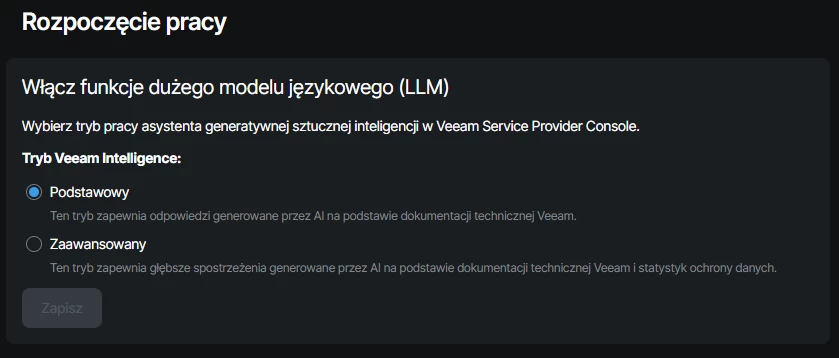
Selecting the Veeam Intelligence mode in VSPC. The screenshot is from the published VUG Poland post.
Until the issue is clarified, I recommend checking the Veeam Intelligence settings under Configuration → Catalog and disabling Advanced mode. You can switch the assistant to Basic or disable the feature entirely, according to the risk assessment for your environment. Changing the mode is not a vendor-confirmed fix for the underlying cause. Feature settings.
If you observe similar behavior, preserve logs and a minimal set of evidence, stop further queries about other customers’ resources, and report the incident to Veeam. Full screenshots containing customer data should go only through the agreed secure support channel, not a public discussion.
📌 Support case status
I reported the issue to Veeam Support. As of September 23, 2026, I am describing results observed in a specific environment. I do not yet have a confirmed cause, a complete list of affected versions, or information about a fix. I am not extending these findings to Veeam Intelligence in VBR or Veeam ONE.
I am not publishing customer data or instructions for reproducing the issue. I will update this post when I receive the vendor’s position or confirm a resolution.
If you provide VSPC to multiple organizations, first check whether Advanced Mode is enabled. A regular portal view that is correctly scoped does not yet confirm that the assistant uses the same data scope.
✅ What should you check in your own environment?
- Determine whether Veeam Intelligence is available to customer accounts and which mode is enabled.
- Verify that the regular Customer Portal view limits data to the correct organization.
- If the assistant returns a similar response, secure a minimal set of evidence and report it to Veeam Support through a secure channel.
- After changing the settings, verify that the feature remains available and record the result. Do not treat a mode change alone as a confirmed fix.
Original source: post on VUG Poland.

Veeam, backup and recovery engineer sharing lessons from implementations, testing and production operations.