Application Backup Repository - when a regular NFS share is not enough
An ABR test in VBR 13.1: PostgreSQL on NFS, snapshots, permissions, Backup Copy, and recovery after a dump is corrupted.
Hello everyone,
After the piece about accounts, MFA, and approving changes, I am returning to repositories. This time I tested Application Backup Repository, or ABR - a new VBR 13.1 feature for applications that create their own backups and write them to NFS.
Instead of starting with Oracle RMAN, I chose a simpler example: PostgreSQL in an LXC container on Proxmox. I wanted to follow the process from writing a dump, through a snapshot and a second copy, to restoring the database. I also checked what happens when a file on the active share is corrupted.
🗄️ What does ABR add to regular NFS?
The application still performs its own backup. In this test, PostgreSQL wrote a dump; with Oracle, RMAN could prepare the copy. Veeam provides storage for these files and handles snapshots, their retention, and immutability. An older state can be exposed at a separate path, or the current share can be reverted to that state. ABR data can also be included in Backup Copy to a VBR repository and then copied to tape.
ABR runs on a Veeam Infrastructure Appliance in the Hardened Repository role, with a ZFS pool prepared for this feature. Each application should have its own ABR - the documentation requires this separation. That allows schedules, retention, and data access to be configured independently.
Veeam does not check here whether a dump completed successfully. If a snapshot includes a file while it is being written, that is the state it will preserve. The schedule therefore needs to be coordinated with the application’s backup. In the script I used toward the end of testing, the output was first written to a temporary file. Only after the export completed successfully was the file given its final name. I prepared this mechanism in the script - ABR does not do it for the application.
The vendor lists Oracle RMAN Incremental Merge, application exports, and device configuration backups among the use cases. My test covered PostgreSQL dumps, not RMAN integration.
🛠️ Preparing VIA and the repository
Configuration starts in Host Management Console. On a VIA deployed as a Hardened Repository, under Backup Infrastructure, we submit a request to enable the Application Backup Repository role. If a Security Officer is configured, they must approve it. Without an SO, the role is enabled immediately. This is one practical example of the separation of duties described in the previous part.
Next, under Storage, we prepare an empty disk and a pool for ABR. After adding the appliance to VBR, we run the New Application Backup Repository wizard: select the host, pool, share name, NFS permissions, and snapshot schedule. Details are in the deployment procedure.
In my lab, VIA was installed from ISO 13.1.0.411 and then updated to 13.1.1.18. VBR ran on a separate VSA with the same build. I assigned a 128 GiB system disk and a separate 256 GiB data disk to the VIA. HMC showed a pool with 254 GB of usable capacity. I named the repository VUG-ABR-REPO and set snapshot retention to 7 days.
During configuration I ran into a few small issues that may save someone else some searching:
- HMC rejected the name abr-data. It accepted abrdata without the hyphen.
- After creating the pool, the Devices tab still showed Not mounted. Volumes already showed active storage in the Application Backup Storage group.
- I saw a separate ABR node in the classic VBR console. In Web UI 13.1.1.18, it was not listed with regular repositories. The standard Linux repository wizard is not used to add ABR.
My first attempt to save NFS permissions also failed with a remote host certificate error. Re-running the VIA host edit wizard in Web UI and installing the client certificates resolved it. I did not disable TLS validation or Multi-Admin Approval. After that, I could save a ReadWrite rule for the test client. This is an observation from my lab, not a universal procedure for fixing certificate errors.
🔑 Permissions and snapshots
I limited access to the share to one IP address. With an empty permissions list, the server refused to mount the share. After I added ReadWrite, reads and writes worked.
I also tested Read. The client still showed the rw option in findmnt, but an attempt to create a file returned Read-only file system. Reads and SHA-256 checks worked. After I restored ReadWrite, I could write a file again. The mount option alone is therefore not enough to test permissions - a write attempt is needed.
For host- or IP-based access, Veeam supports NFSv3, v4.1, and v4.2. Kerberos requires NFSv4.1 or v4.2 and joining the ABR host to a domain. For the Windows system NFS client, the documentation specifies NFSv3. I used NFSv4.2 without Kerberos in this test.
The wizard also has a Create repository snapshots option that must be selected. A working share by itself does not mean a data history is being created. In addition to manual snapshots, I checked the schedule: another restore point was created automatically at midnight.
🐧 PostgreSQL in LXC
I chose LXC because Veeam Plug-in for Proxmox VE does not support backing up these containers. ABR can protect a dump created by an application in a container, but it is not a backup of the entire LXC. It will not recover the container’s configuration, operating system, or installed packages.
My first attempt to mount the NFS share directly from an unprivileged Ubuntu 24.04 container failed with Operation not permitted, even after setting mount=nfs,nesting=1. In a privileged test container, the mount request reached the server, which then checked ABR permissions. I continued testing with that second option.
I would not take this as a recommendation to convert existing containers to privileged ones. Another possibility is mounting the NFS share on the Proxmox host and passing the directory through as a bind mount, but I did not test that option. It requires attention to permissions, UID/GID mapping, and container migration. The contents of a bind mount are not included in a vzdump backup.
Three database versions and reverting the share
I prepared a test PostgreSQL database. I exported its contents to a dump file three times in succession, labeling the dumps A, B, and C. Before each export, I added new records to the database so I could later check that I had recovered data from the correct point in time. I saved the file checksums and query results for comparison after recovery. I created an ABR snapshot after saving each dump.
First, I used Instant Export for snapshot A. The older data appeared at a different, read-only NFS path. The file checksum matched the original. I restored it to a separate database and confirmed that it contained the data from when the first export was made.
Then I tested Revert Snapshot, which rolls back the active share. After reverting to A, files B and C were no longer present, while file A still matched its saved hash. A later revert to the retained snapshot C restored A, B, and C. Here I checked the file state on the share; I did not restore the database again immediately after the Revert operation.
I would use Instant Export to read an older dump. Revert changes the current contents of the share, so application writes must be stopped and a scheduled change window is required.
📦 Backup Copy and recovery from the second copy
I created the VUG-ABR-COPY job in the classic console under Backup Copy → Image-level backup, adding ABR as the source. The menu name can be misleading - in this case it copies application repository data, not a container image.
I selected Immediate mode, Direct transport, and Default Backup Repository on a separate VSA. For this target repository, the wizard would not let me continue until GFS was enabled. I set 7 days of retention and one weekly GFS point. The GFS requirement applied to the target repository with immutability, not to the source ABR itself. One weekly point was a choice for this test.
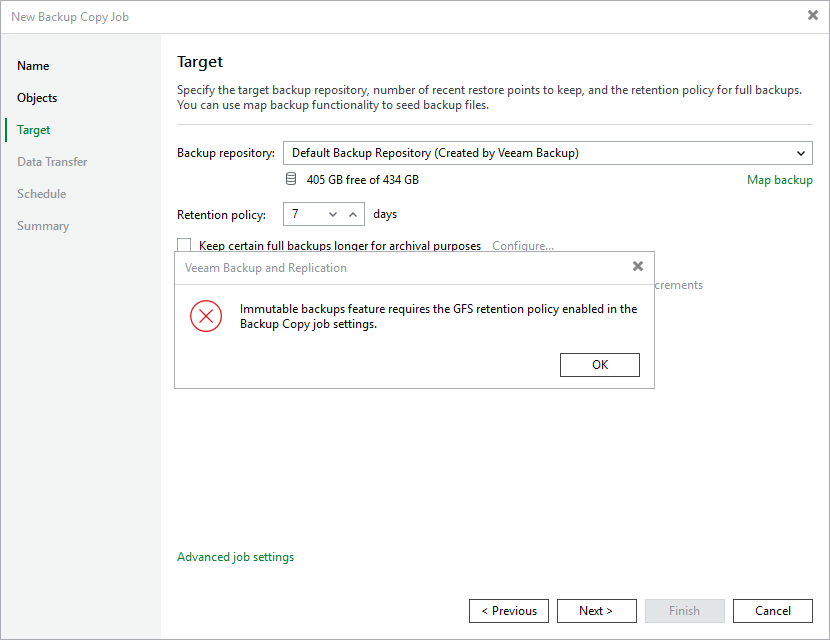
The Backup Copy wizard reported that GFS was missing for the selected target repository.
The copy completed without warnings or errors. The log showed a ZFS snapshot transfer. The data set was small, so I do not draw performance conclusions from this result.
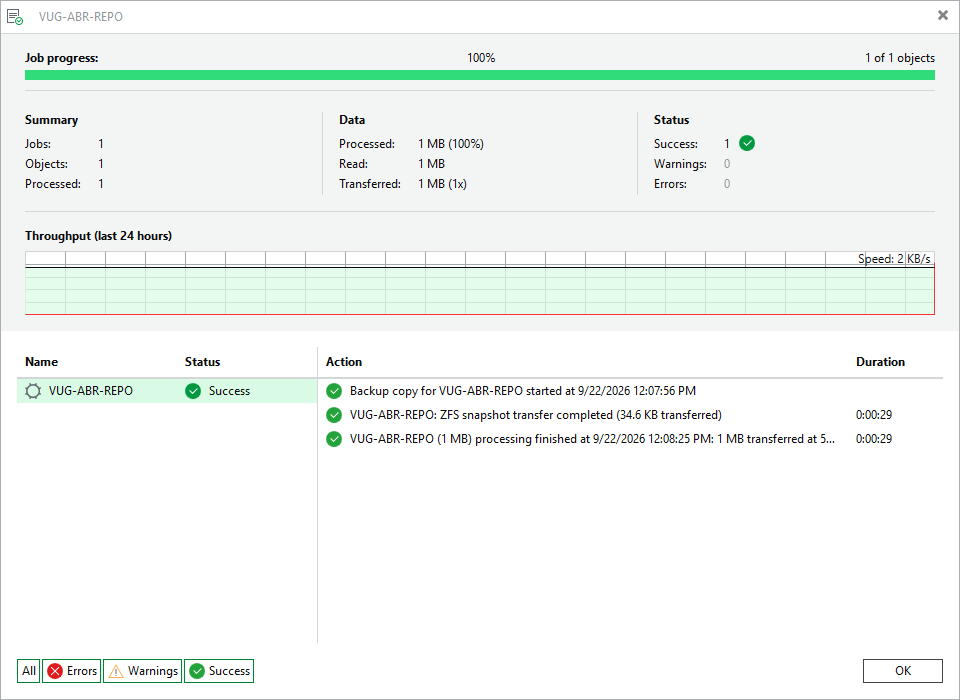
Completed Backup Copy session for VUG-ABR-REPO.
Under Disk (Copy), I selected Instant recovery and the incremental restore point from September 22, 2026, at 12:09:49. Veeam published a temporary NFS share on ABR-REPO01. I mounted it on a client with the ro option, meaning read-only, checked file checksums, and restored each dump to its own PostgreSQL database. In this session the restriction was applied on the client side; this was not a test of the server blocking writes.
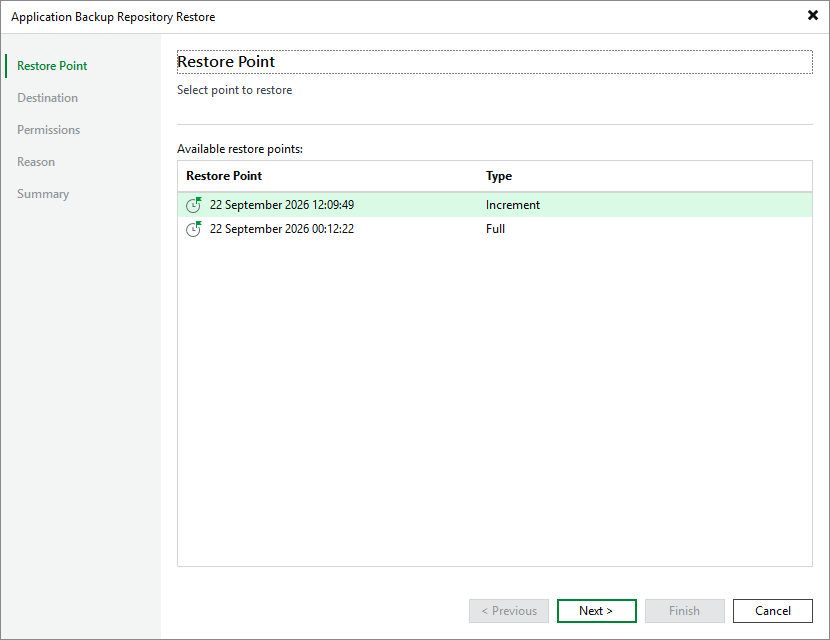
I selected the newer incremental point from the secondary copy for recovery.
All three versions were recovered successfully. In each database I checked the record count and confirmed the contents matched the data saved before backup. The file checksums also matched. I did not stop at a Success status in Veeam - I checked that the recovered files were usable and contained the expected data. I restored the test databases to the same PostgreSQL instance; this was not a recovery of the entire server.
Stop publishing after recovery
Before starting recovery, Veeam warned that Backup Copy jobs using this chain would fail while recovery was in progress.
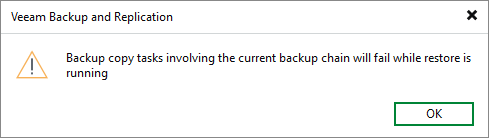
Warning shown before making data from the copy available.
The session first showed Exclusive access acquired, followed by Share created successfully and Waiting for user action. The last state did not mean there was an error. The share was available and waiting for the work to finish.
After unmounting the client, I stopped publishing. The session ended with Stopped / Success, and the next Backup Copy synchronization also completed successfully. Closing the session window alone does not replace Stop publishing.
A corrupted dump and new version D
In the next test, I secured file C and then changed its first byte on the active share. Its SHA-256 changed, and pg_restore rejected the dump as an invalid archive. I did not modify data in the locked snapshot.
I retrieved the valid file from the share published from Backup Copy. It had the original SHA-256 checksum, and this time the database restore succeeded. The record count and checksum of the record contents matched the results saved before the corruption.
Finally, I added a new record to the database and created another dump, labeling it D. After a snapshot was created, another incremental Backup Copy point appeared. I recovered the database from it and confirmed that it also contained the new record. The record count and both file and data checksums matched. This confirmed that after the earlier recovery, copying also included newly written data.
While publishing dump D, I also tested concurrent access to current and older data. Writing a test file to the current share worked, while the share recovered from the copy, with a Read rule on the server, rejected writes even though the client mounted it with rw. The new file did not appear in the historical export. After the test, I removed the test file, unmounted both shares, and stopped publishing. The final copy synchronization also completed successfully.
⚠️ What should be considered before deployment?
ABR uses local VIA disk space. It does not support storing its data on remote FC or iSCSI devices. According to the Veeam documentation, checked on September 22, 2026, each ABR consumes one VUL instance in Veeam Data Platform Advanced or Premium. Socket-based licensing is not supported.
The Veeam system requirements, checked the same day for build 13.1.1.18, specify a minimum of 4 CPU cores (vCPU) at 1 GHz or higher, 8 GB RAM, and a 120 GB system disk. Data space must be provided separately; more memory may be needed depending on the amount of protected data. For capacity planning, I would watch two thresholds: performance may decrease when pool usage exceeds 80%, and snapshot creation stops at 97%. Space is needed for data changes throughout the entire retention period, not just for the next backup file.
Recovering data from Backup Copy requires a host with the Application Backup Repository role. A repository containing copy files is not enough by itself. Veeam lets you select another ABR host, which matters if the original server is lost. In the tests described here, I published the data on the source ABR-REPO01. I have not yet tested with the source host offline, so I do not consider these results confirmation of a complete DR procedure.
I also did not test deleting a snapshot while a lock was held or the full expiration cycle of the 7-day retention. Oracle RMAN, Kerberos, and tape copy are outside the scope of this lab.
The Release Notes also list a known issue: if the network is interrupted during snapshot transfer, the copy job may become permanently stuck with the error Source snapshot is already present in target dataset. I did not trigger this issue in the test. It should be considered when assessing a specific build and planning failure tests.
💬 Where do you see a place for ABR?
I mainly see it as a fit for an application that already has a proven way to create dumps but writes them to a regular NFS share. ABR adds snapshots and a second copy without changing the backup tool itself. In my case, I was able to restore the PostgreSQL database from those files, including after deliberately corrupting the current dump.
Are you already using ABR, particularly with Oracle RMAN Incremental Merge? I am also interested in whether you have tested recovery from Backup Copy on another ABR host, without access to the source repository.
✅ What would I check before using ABR?
- Does the application finish writing files before a snapshot, and can data be restored from them?
- Is NFS access restricted to the right clients, and have Read and ReadWrite rules been checked with a write attempt?
- Is there room for data changes throughout the snapshot retention period?
- Does Backup Copy go to a separate repository, and can we recover data from it?
- Do we have an ABR host to publish the copy, including in a source-appliance-loss scenario?
In my test, I checked recovery on the active source host. Recovery after losing it needs a separate test.
🔗 Sources
- What’s New - Enterprise Application and Database Protection
- Application Backup Repository - limitations
- VBR 13.1 Release Notes
- ABR system requirements
- Deploying and approving the ABR role in HMC
- Adding ABR in VBR
- Repository and NFS access settings
- Snapshot schedule
- Veeam Plug-in for Proxmox VE limitations, including the lack of LXC support
- Proxmox pct - NFS bind mounts in LXC and backup boundaries
- Creating a Backup Copy for an Application Backup Repository
- Backup Copy requirements
- Selecting a host to recover ABR from a copy

Veeam, backup and recovery engineer sharing lessons from implementations, testing and production operations.